This article from 2013 is the second out of four that I wrote on this topic over ten years. For the other three, see the links below.
Some time ago I documented with amazement how Adobe managed to design the same dialogue differently in each app that I looked at.
Meanwhile new versions of the apps are out, and Adobe has published new apps. The CS6 suite runs on my office Mac, and I have some of the edge apps installed.
Time for an update. How does the dialogue look like that appears when you want to close a file with unsaved changes? Did Adobe even out the inconsistencies, or is it still a mess? Let’s have a look.
CS6 Creative Suite
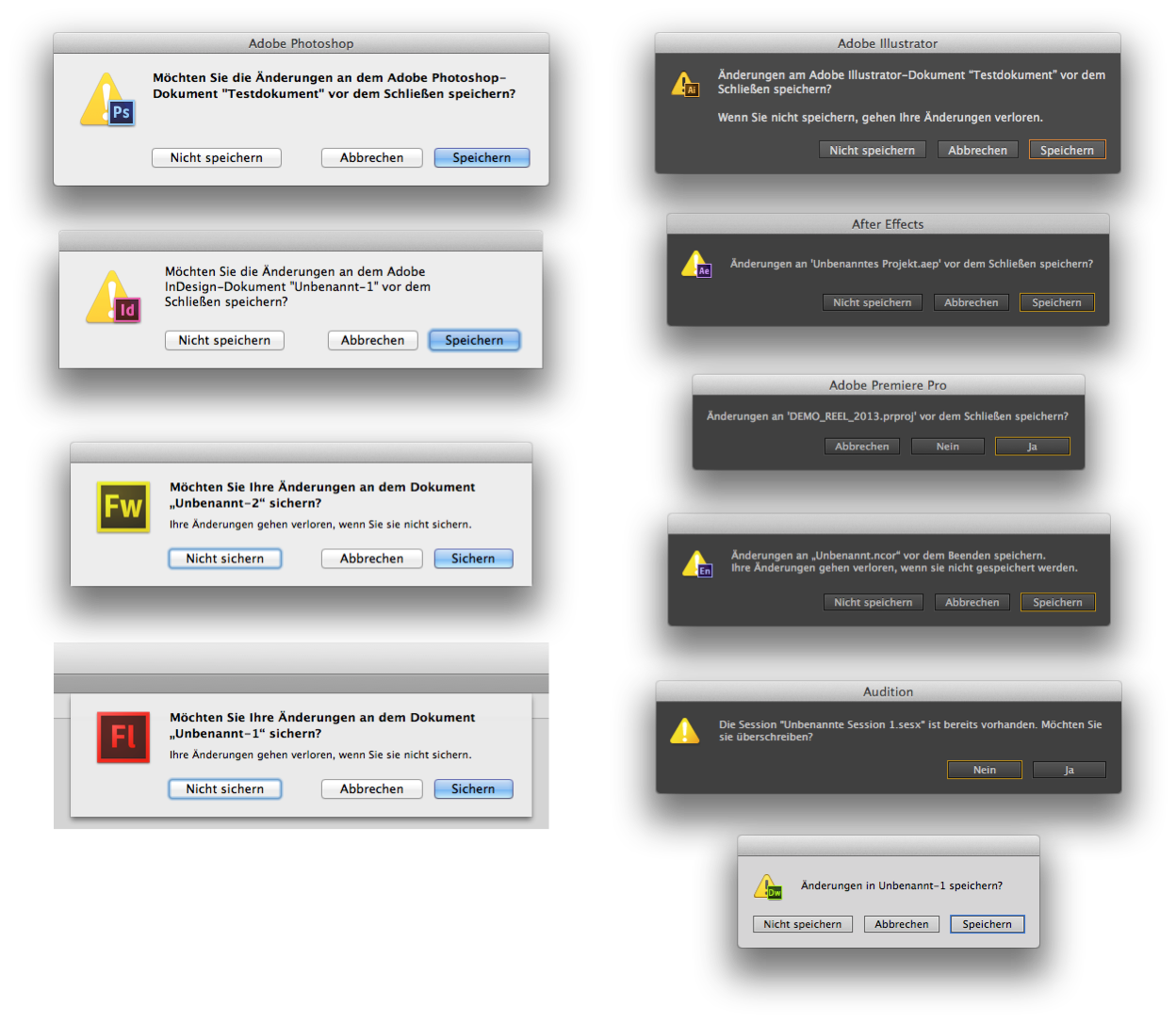
Yes, these are the “Save Changes” dialogues from the latest versions of Photoshop, InDesign, Fireworks, Flash, Illustrator, After Effects, Premiere, Encore, Audition and Dreamweaver.
Not two of them look the same.
Check it out yourself. There is always at least one thing that is different. It is indeed astonishing how many ways there are in which you can assemble the parts of this simple dialogue, and Adobe ships another version with every app of the same suite.
Concidence?
Or does anyone at Adobe look at what’s not been modified and then chooses to change just that? Take: size, sheet or modal, background color, text on title bar or not, icon size and type, text (font, line length, additional text or not), quotation marks (typographic or incorrect, double or single), “Sichern” or “Speichern”, and button arrangement.
I cannot believe this.
Other Adobe apps
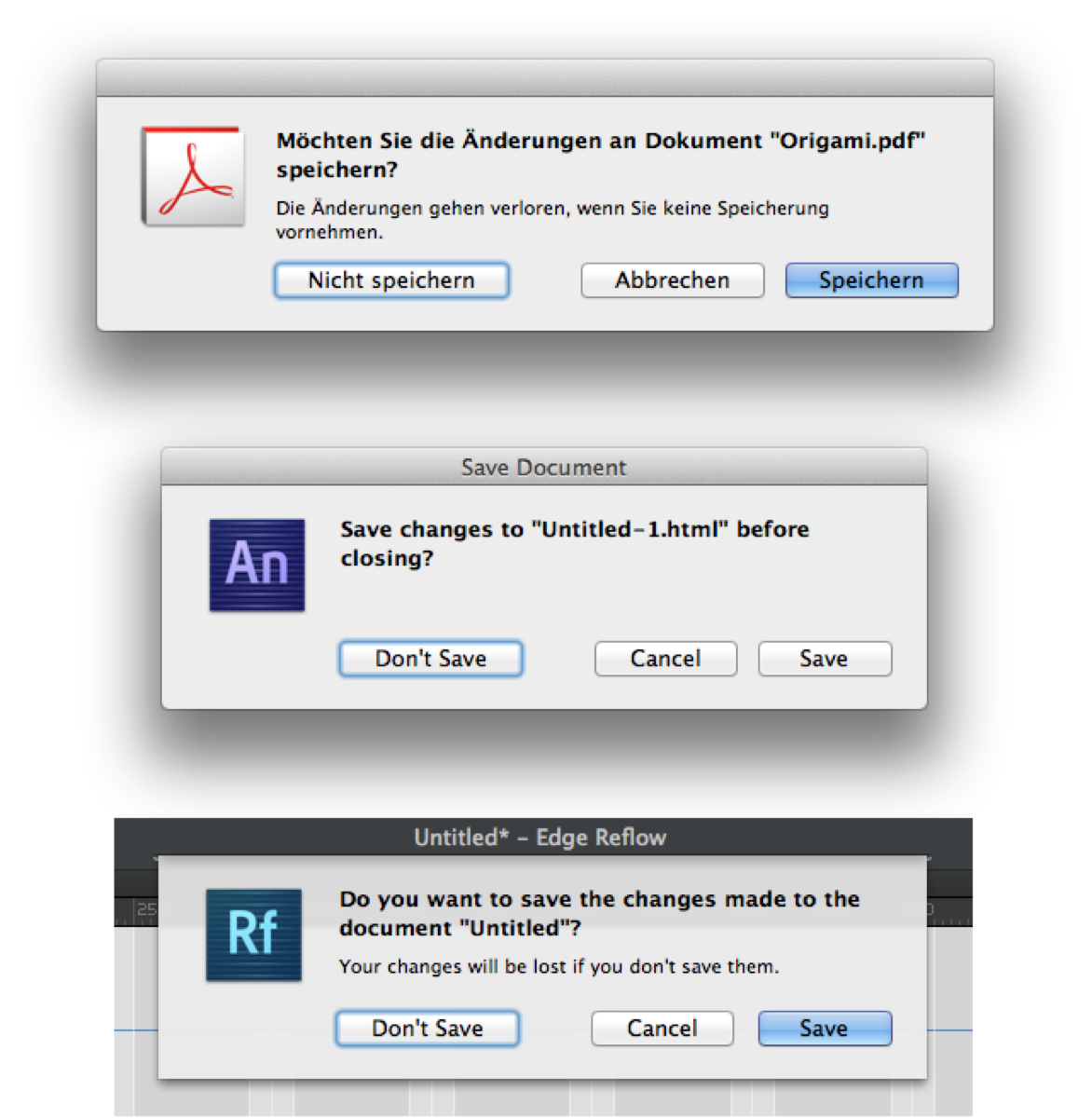
Again different, with a new permutation in all three of them. The thing is, I can’t see a method or system in this.
- The dialogue is done as a sheet in veteran app Flash as well as in the new Reflow, but not in the also new app Animate or in the second app that is an acquisition from Macromedia, Fireworks
- Flagship apps Illustrator and Photoshop come with dark interfaces, but only Illustrator’s dialogue is also dark
- Photoshop as well as InDesign are missing the text saying unsaved changes will be lost. Text is bold in PS, but not in InDesign
- The German text seems to have been translated new in every dialogue, or it’s already the original that is different: »Möchten Sie Ihre Änderungen sichern« versus »Möchten Sie die Änderungen speichern«; »Änderungen an … speichern« versus »Änderungen in … speichern«.
Nobody seems to care.
Standards, Schmandards
Obviously Adobe does not have a template for this standard dialogue that is used for every new app. But is it not a huge waste of effort to build it from scratch every time? Even if you concede that all Adobe apps are published on MacOS and Windows, they could well served with either two versions that adhere to the platform standards or with one independent interface that is consistent within the adobe suite.
I haven’t looked on Windows, but on MacOS there is this:
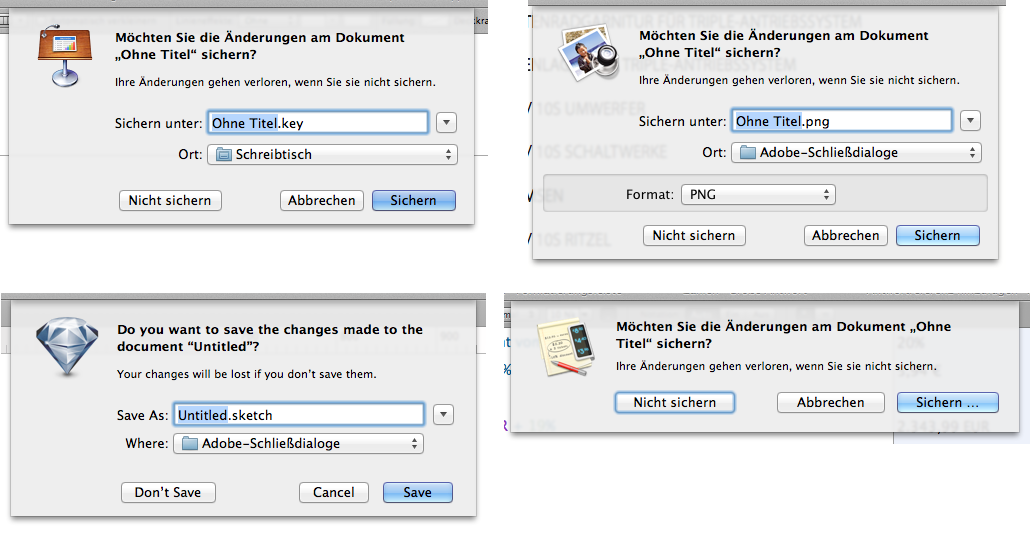
Pretty consistent, isn’t it? Shown are Apple’s Keynote and Preview, and third party apps Sketch and Soulver. And although there are differences: Apart from Soulver’s dialogue being slightly wider, same elements are designed exactly the same. It’s just that not every dialog contains every element that’s possible.
- All dialogues are done as sheets
- The icon is the app icon without a warning sign
- Spacings are equal
- the phrasing is the same (even the quotation marks are correct and fit the language)
The difference is that three of the apps offer a location for the file (all but Soulver), and Preview additionally lets you choose the file format.
So there is a standard, you just have to use it. And indeed there is one Adobe app that adheres to that exact standard (out of the ones that I have checked). But you would not guess which app that is.
It’s Flash.
Adobe’s save dialogues through the years:
- Adobe Reinvents The Wheel—time and Time again
- Babylon Adobe 2013
- Babylon Adobe 2017
- Babylon Adobe 2021